<?xml version="1.0" encoding="utf-8"?>
<feed xmlns="http://www.w3.org/2005/Atom">
  <title>KOK Blog</title>
  
  
  <link href="https://en.kok.plus/atom.xml" rel="self"/>
  
  <link href="https://en.kok.plus/"/>
  <updated>2025-08-21T08:52:09.997Z</updated>
  <id>https://en.kok.plus/</id>
  
  <author>
    <name>KOK</name>
    
  </author>
  
  <generator uri="https://hexo.io/">Hexo</generator>
  
  <entry>
    <title>HexoNav - Hexo Website Navigation Theme</title>
    <link href="https://en.kok.plus/hexonav/"/>
    <id>https://en.kok.plus/hexonav/</id>
    <published>2024-04-23T11:29:31.000Z</published>
    <updated>2025-08-21T08:52:09.997Z</updated>
    
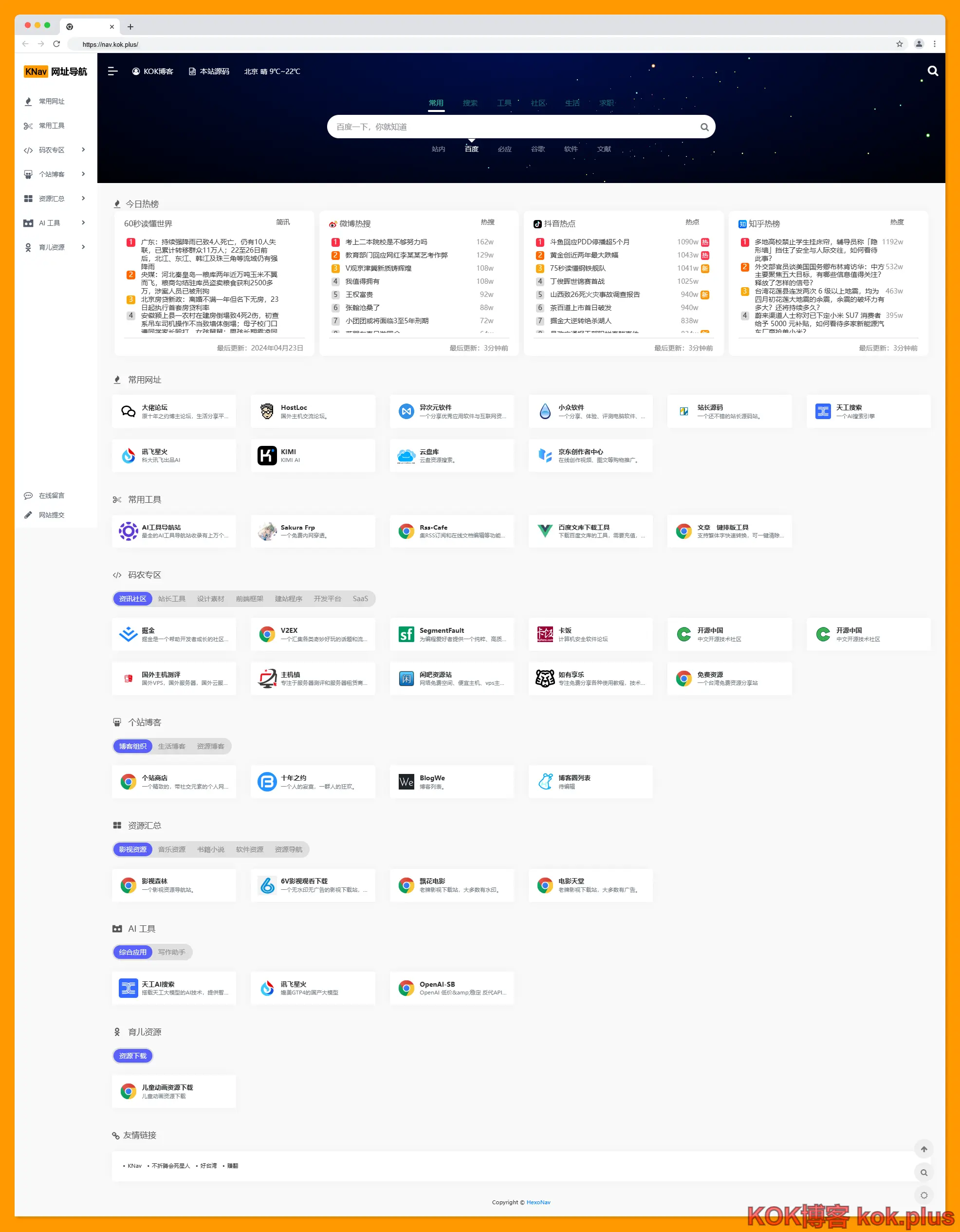
    <content type="html"><![CDATA[<p>HexoNav is a web URL navigation theme created based on HEXO.</p><p>Advantages and disadvantages of using HexoNav to build a web URL navigation site:</p><p><strong>Advantages:</strong></p><ol><li>No need to build your own backend service.</li><li>Pure static content loads quickly.</li><li>Can use free static hosting.</li></ol><p><strong>Disadvantages:</strong></p><ol><li>When there is a large amount of data, it is more troublesome to modify the sorting.</li></ol><h1 id="I-Main-Features"><a href="#I-Main-Features" class="headerlink" title="I. Main Features"></a>I. Main Features</h1><ol><li>Site Search: Enter keywords in the search box to automatically search for web page titles and descriptions.</li><li>Redirect Page: Click on the redirect page, and use the redirect page to count click-throughs.</li><li>Today’s Hot List: Use the LyToday-JS plugin to display today’s news hot list.</li><li>Weather Forecast: Use a weather API web plugin to display the weather of the IP location</li></ol><p>.</p><h1 id="II-Demonstration-Effect"><a href="#II-Demonstration-Effect" class="headerlink" title="II. Demonstration Effect"></a>II. Demonstration Effect</h1><p>Demonstration Site: <a href="https://nav.kok.plus/">https://nav.kok.plus</a></p><p>Demonstration Image:<br><img src="https://pic.kok.plus/2024/knav.3rb178zog8.webp" alt="knav"></p><h1 id="III-Installing-the-Theme"><a href="#III-Installing-the-Theme" class="headerlink" title="III. Installing the Theme"></a>III. Installing the Theme</h1><blockquote><p>Hexo version needs to be greater than 7.0.0</p></blockquote><h2 id="1-Install-the-Theme"><a href="#1-Install-the-Theme" class="headerlink" title="1. Install the Theme"></a>1. Install the Theme</h2><p>Download the theme and place it in the themes directory.<br>hexonav.zip: <a href="http://ct.kok.plus/f/1273598-1060985285-5511f1?p=kokboke">Download Link</a></p><h2 id="2-Enable-the-Theme"><a href="#2-Enable-the-Theme" class="headerlink" title="2. Enable the Theme"></a>2. Enable the Theme</h2><p>In the <code>_config.yml</code> file located at the root directory of Hexo, change the <code>theme</code> value to <code>hexonav</code>.</p><figure class="highlight yaml"><table><tr><td class="gutter"><pre><span class="line">1</span><br></pre></td><td class="code"><pre><span class="line"><span class="attr">theme:</span> <span class="string">hexonav</span></span><br></pre></td></tr></table></figure><h2 id="3-Create-a-Theme-Configuration-File"><a href="#3-Create-a-Theme-Configuration-File" class="headerlink" title="3. Create a Theme Configuration File"></a>3. Create a Theme Configuration File</h2><p>Copy themes&#x2F;hexonav&#x2F;_config.yml and rename the file to _config.hexonav.yml, then place it in the root directory.</p><h1 id="IV-Theme-Configuration"><a href="#IV-Theme-Configuration" class="headerlink" title="IV. Theme Configuration"></a>IV. Theme Configuration</h1><h2 id="1-CDN-Configuration"><a href="#1-CDN-Configuration" class="headerlink" title="1. CDN Configuration"></a>1. CDN Configuration</h2><figure class="highlight yaml"><table><tr><td class="gutter"><pre><span class="line">1</span><br></pre></td><td class="code"><pre><span class="line"><span class="attr">cdn:</span> <span class="string">/</span> <span class="comment"># CDN for static files, for example, fill in https://aa.com/  <span class="doctag">Note:</span> Add a slash at the end. The following various links will be prefixed with this, pay attention to the cross-domain issue of font files.</span></span><br></pre></td></tr></table></figure><h2 id="2-Website-Icon"><a href="#2-Website-Icon" class="headerlink" title="2. Website Icon"></a>2. Website Icon</h2><figure class="highlight yaml"><table><tr><td class="gutter"><pre><span class="line">1</span><br></pre></td><td class="code"><pre><span class="line"><span class="attr">favicon:</span> <span class="string">favicon.ico</span></span><br></pre></td></tr></table></figure><h2 id="3-Header-Dynamic-Background"><a href="#3-Header-Dynamic-Background" class="headerlink" title="3. Header Dynamic Background"></a>3. Header Dynamic Background</h2><figure class="highlight yaml"><table><tr><td class="gutter"><pre><span class="line">1</span><br></pre></td><td class="code"><pre><span class="line"><span class="attr">headerbg:</span> <span class="string">headerbg/13.html</span> <span class="comment"># Header background effect, built-in 13 effects, you can directly access themes/hexonav/source/headerbg/*.html to view</span></span><br></pre></td></tr></table></figure><h2 id="4-Icon-Acquisition-Interface"><a href="#4-Icon-Acquisition-Interface" class="headerlink" title="4. Icon Acquisition Interface"></a>4. Icon Acquisition Interface</h2><p>This configuration is used to obtain the icons corresponding to the website URLs.</p><figure class="highlight yaml"><table><tr><td class="gutter"><pre><span class="line">1</span><br><span class="line">2</span><br><span class="line">3</span><br></pre></td><td class="code"><pre><span class="line"><span class="attr">icoapi:</span></span><br><span class="line">  <span class="attr">enable:</span> <span class="literal">true</span> <span class="comment"># After enabling, the img address in the data file will become invalid.</span></span><br><span class="line">  <span class="attr">url:</span> <span class="string">&#x27;https://api.ekumao.com/api/favicon?url=&#x27;</span>  <span class="comment"># Fill in the URL of the ICO API</span></span><br></pre></td></tr></table></figure><p><strong>(1) Using Free ICO Interfaces</strong></p><p>I have collected two free interfaces here, the first one is Google’s service, and the second one is a personal site.<br><a href="https://t3.gstatic.cn/faviconV2?client=SOCIAL&type=FAVICON&fallback_opts=TYPE,SIZE,URL&size=256&url=">https://t3.gstatic.cn/faviconV2?client=SOCIAL&amp;type=FAVICON&amp;fallback_opts=TYPE,SIZE,URL&amp;size=256&amp;url=</a><br><a href="https://ico.kucat.cn/get.php?url=">https://ico.kucat.cn/get.php?url=</a></p><p><strong>(2) Building Your Own ICO Icon Acquisition Service Interface</strong></p><p>Source Code: <a href="http://ct.kok.plus/f/1273598-1060970153-e2a685">getFavicon-master.zip</a></p><p><strong>Installation and Usage</strong></p><p>Upload to the website root directory or the favicon folder.</p><p>Set the default icon and cache time in the <code>get.php</code> file.</p><p>Set the cache folder to 755 permissions.</p><p>Then visit <a href="http://you.url/favicon/get.php?url=https://kok.plus">http://you.url/favicon/get.php?url=https://kok.plus</a></p><p>If there is a situation where it cannot be obtained, it is recommended to delete the cache and try again.</p><p>Note: The favicon in the text is the api folder, set it as appropriate.</p><p><strong>Pseudo-static</strong></p><p>Setting up pseudo-static is to facilitate caching after you have set up a CDN.</p><p>Nginx Rules</p><figure class="highlight awk"><table><tr><td class="gutter"><pre><span class="line">1</span><br></pre></td><td class="code"><pre><span class="line">rewrite ^<span class="regexp">/favicon/</span>(.*)\.png$ <span class="regexp">/favicon/g</span>et.php?url=<span class="variable">$1</span>;</span><br></pre></td></tr></table></figure><p> Apache Rules</p><figure class="highlight apache"><table><tr><td class="gutter"><pre><span class="line">1</span><br><span class="line">2</span><br><span class="line">3</span><br><span class="line">4</span><br></pre></td><td class="code"><pre><span class="line"><span class="section">&lt;IfModule mod_rewrite.c&gt;</span></span><br><span class="line"><span class="attribute">RewriteEngine</span> <span class="literal">On</span></span><br><span class="line"><span class="attribute">RewriteRule</span> ^favicon/(.*)\.png$ favicon/get.php?url=$<span class="number">1</span><span class="meta"> [L]</span></span><br><span class="line"><span class="section">&lt;/IfModule&gt;</span></span><br></pre></td></tr></table></figure><p>Call Method <a href="http://you.url/favicon/kok.plus.png">http://you.url/favicon/kok.plus.png</a></p><p>Note: The target website address should not have http(s):&#x2F;&#x2F;</p><p>It is recommended not to use pseudo-static because sometimes the URLs you have included may have multiple levels of dynamic addresses.</p><p>If you want to use pseudo-static, you need to modify</p><p>tab.ejs tab1.ejs tab2.ejs These three files</p><p>Search for:</p><figure class="highlight gcode"><table><tr><td class="gutter"><pre><span class="line">1</span><br><span class="line">2</span><br><span class="line">3</span><br><span class="line">4</span><br><span class="line">5</span><br></pre></td><td class="code"><pre><span class="line">&lt;<span class="meta">%</span> <span class="keyword">if</span> <span class="comment">(theme.icoapi.enable)</span> &#123; <span class="meta">%</span>&gt;</span><br><span class="line">&lt;img class=<span class="string">&quot;lazy&quot;</span> data-src=<span class="string">&quot;&lt;%= theme.icoapi.url %&gt;&lt;%= menu.url %&gt;&quot;</span> &gt;</span><br><span class="line">&lt;<span class="meta">%</span> &#125; else &#123; <span class="meta">%</span>&gt;</span><br><span class="line">&lt;img class=<span class="string">&quot;lazy&quot;</span> data-src=<span class="string">&quot;&lt;%= theme.icoapi.cdn %&gt;&lt;%= menu.img %&gt;&quot;</span> &gt;</span><br><span class="line">&lt;<span class="meta">%</span> &#125; <span class="meta">%</span>&gt;</span><br></pre></td></tr></table></figure><p>Modify to:</p><figure class="highlight stylus"><table><tr><td class="gutter"><pre><span class="line">1</span><br></pre></td><td class="code"><pre><span class="line">&lt;<span class="selector-tag">img</span> class=<span class="string">&quot;lazy&quot;</span> data-<span class="attribute">src</span>=<span class="string">&quot;&lt;%= menu.url.replace(/^https?:\/\//i, &#x27;&#x27;) %&gt;&quot;</span> &gt;</span><br></pre></td></tr></table></figure><p>The function is to output the address without https:&#x2F;&#x2F; and http:&#x2F;&#x2F;</p><p>You can output the correct format when you call the pseudo-static</p><p><a href="http://you.url/favicon/website_address.png">http://you.url/favicon/website_address.png</a></p><h2 id="5-Redirect-Configuration"><a href="#5-Redirect-Configuration" class="headerlink" title="5. Redirect Configuration"></a>5. Redirect Configuration</h2><figure class="highlight yaml"><table><tr><td class="gutter"><pre><span class="line">1</span><br><span class="line">2</span><br><span class="line">3</span><br></pre></td><td class="code"><pre><span class="line"><span class="attr">ctr:</span>  <span class="comment"># Use a third-party statistics service to count the number of clicks on the website</span></span><br><span class="line">  <span class="attr">enable:</span> <span class="literal">true</span> <span class="comment"># After enabling, use /go/?url= to redirect, you need to enter the command hexo new page go to create a page</span></span><br><span class="line">  <span class="attr">code:</span> <span class="string">&#x27; &#x27;</span> <span class="comment"># Fill in the third-party statistics code, it is required to display detailed visited pages.</span></span><br></pre></td></tr></table></figure><h2 id="6-Today’s-Hot-List"><a href="#6-Today’s-Hot-List" class="headerlink" title="6. Today’s Hot List"></a>6. Today’s Hot List</h2><p>The use of the lytoday-JS plugin has a daily limit of 200 times. This is an interface for Chinese hot topics, and I have not yet found an English interface. If you come across a good one, please leave a message for me.</p><figure class="highlight yaml"><table><tr><td class="gutter"><pre><span class="line">1</span><br><span class="line">2</span><br><span class="line">3</span><br></pre></td><td class="code"><pre><span class="line"><span class="attr">lytoday:</span></span><br><span class="line">  <span class="attr">enable:</span> <span class="literal">true</span> <span class="comment"># Enable the Today&#x27;s Hot List feature, the interface has a free access limit of 200 times per day.</span></span><br><span class="line">  <span class="attr">url:</span> <span class="string">https://lytoday.lylme.com/?day=60s&amp;hot=weibo,douyin,zhihu</span>  <span class="comment"># Generate your interface address at https://lytoday.lylme.com/code.html</span></span><br></pre></td></tr></table></figure><h2 id="7-Weather-Forecast"><a href="#7-Weather-Forecast" class="headerlink" title="7.Weather Forecast"></a>7.Weather Forecast</h2><p><a href="http://www.tianqiapi.com/">http://www.tianqiapi.com</a></p><p>This is a Chinese weather interface. If you have interfaces for other countries, please provide them to me.</p><figure class="highlight yaml"><table><tr><td class="gutter"><pre><span class="line">1</span><br></pre></td><td class="code"><pre><span class="line"><span class="attr">qweather:</span> <span class="string">&#x27;&lt;div class=&quot;rounded-circle weather&quot;&gt;&lt;div id=&quot;he-plugin-simple&quot; style=&quot;display: contents;&quot;&gt;&lt;/div&gt;&lt;iframe scrolling=&quot;no&quot; src=&quot;https://widget.tianqiapi.com/?style=te&amp;skin=pitaya&amp;color=FFFFFF&amp;paddingtop=6&quot;  frameborder=&quot;0&quot; width=&quot;200&quot; height=&quot;24&quot; allowtransparency=&quot;true&quot;&gt;&lt;/iframe&gt;&lt;/div&gt;&#x27;</span> <span class="comment"># Weather code in the top navigation bar</span></span><br></pre></td></tr></table></figure><h2 id="8-Insert-Code-Configuration"><a href="#8-Insert-Code-Configuration" class="headerlink" title="8. Insert Code Configuration"></a>8. Insert Code Configuration</h2><p>Two insertion points are set, one for the header and one for the footer.</p><figure class="highlight yaml"><table><tr><td class="gutter"><pre><span class="line">1</span><br><span class="line">2</span><br><span class="line">3</span><br><span class="line">4</span><br><span class="line">5</span><br><span class="line">6</span><br><span class="line">7</span><br></pre></td><td class="code"><pre><span class="line"><span class="attr">custom:</span></span><br><span class="line">  <span class="attr">head:</span> <span class="string">|-</span> <span class="comment"># The following content is inserted inside the &lt;head&gt;&lt;/head&gt; tags, you can set multiple lines, pay attention to at least four spaces at the beginning of each line</span></span><br><span class="line">    <span class="string">&lt;!--</span> <span class="string">Directly</span> <span class="string">add</span> <span class="string">HTML</span> <span class="string">content</span> <span class="string">--&gt;</span></span><br><span class="line">    <span class="string">&lt;!--</span> <span class="string">You</span> <span class="string">can</span> <span class="string">set</span> <span class="string">multiple</span> <span class="string">lines</span> <span class="string">--&gt;</span></span><br><span class="line">  <span class="attr">foot:</span> <span class="string">|-</span> <span class="comment"># The following content is inserted before the &lt;/body&gt; tag, you can set multiple lines, pay attention to at least four spaces at the beginning of each line. Note that a single code should not have a line break.</span></span><br><span class="line">    <span class="string">Copyright</span> <span class="string">©</span> <span class="string">&lt;a</span> <span class="string">target=&quot;_blank&quot;</span> <span class="string">href=&quot;&quot;&gt;HexoNav&lt;/a&gt;</span></span><br><span class="line">    <span class="string">&lt;script&gt;var</span> <span class="string">_hmt</span> <span class="string">=</span> <span class="string">_hmt</span> <span class="string">||</span> []<span class="string">;(function()</span> &#123;<span class="string">var</span> <span class="string">hm</span> <span class="string">=</span> <span class="string">document.createElement(&quot;script&quot;);hm.src</span> <span class="string">=</span> <span class="string">&quot;https://hm.baidu.com/hm.js?062685e39e06f9947b865df2e13901f7&quot;</span><span class="string">;var</span>  <span class="string">s</span> <span class="string">=</span> <span class="string">document.getElementsByTagName(&quot;script&quot;)</span>[<span class="number">0</span>]<span class="string">;</span> <span class="string">s.parentNode.insertBefore(hm</span>, <span class="string">s);</span>&#125;<span class="string">)();&lt;/script&gt;</span></span><br></pre></td></tr></table></figure><h2 id="9-LOGO-Configuration"><a href="#9-LOGO-Configuration" class="headerlink" title="9. LOGO Configuration"></a>9. LOGO Configuration</h2><figure class="highlight yaml"><table><tr><td class="gutter"><pre><span class="line">1</span><br><span class="line">2</span><br><span class="line">3</span><br><span class="line">4</span><br><span class="line">5</span><br></pre></td><td class="code"><pre><span class="line"><span class="attr">logo:</span></span><br><span class="line">  <span class="attr">iconlight:</span> <span class="string">images/logo.png</span></span><br><span class="line">  <span class="attr">icondark:</span> <span class="string">images/logo.png</span></span><br><span class="line">  <span class="attr">light:</span> <span class="string">images/logo-light.png</span></span><br><span class="line">  <span class="attr">dark:</span> <span class="string">images/logo-dark.png</span></span><br></pre></td></tr></table></figure><h2 id="10-Website-Categories"><a href="#10-Website-Categories" class="headerlink" title="10. Website Categories"></a>10. Website Categories</h2><p>Note that the <code>config</code> content corresponds to the data file <code>source/_data/file_name.yml</code></p><figure class="highlight yaml"><table><tr><td class="gutter"><pre><span class="line">1</span><br><span class="line">2</span><br><span class="line">3</span><br><span class="line">4</span><br><span class="line">5</span><br><span class="line">6</span><br><span class="line">7</span><br><span class="line">8</span><br><span class="line">9</span><br><span class="line">10</span><br><span class="line">11</span><br><span class="line">12</span><br><span class="line">13</span><br><span class="line">14</span><br><span class="line">15</span><br><span class="line">16</span><br><span class="line">17</span><br><span class="line">18</span><br><span class="line">19</span><br><span class="line">20</span><br><span class="line">21</span><br><span class="line">22</span><br><span class="line">23</span><br><span class="line">24</span><br><span class="line">25</span><br><span class="line">26</span><br><span class="line">27</span><br><span class="line">28</span><br><span class="line">29</span><br><span class="line">30</span><br><span class="line">31</span><br><span class="line">32</span><br><span class="line">33</span><br><span class="line">34</span><br><span class="line">35</span><br><span class="line">36</span><br><span class="line">37</span><br><span class="line">38</span><br></pre></td><td class="code"><pre><span class="line"><span class="comment"># Website category config value corresponds to the data file name</span></span><br><span class="line"><span class="attr">menu:</span></span><br><span class="line">  <span class="bullet">-</span> <span class="attr">name:</span> <span class="string">Common</span> <span class="string">Websites</span></span><br><span class="line">    <span class="attr">icon:</span> <span class="string">fa</span> <span class="string">fa-fire</span></span><br><span class="line">    <span class="attr">config:</span> <span class="string">01x</span></span><br><span class="line">  <span class="bullet">-</span> <span class="attr">name:</span> <span class="string">Common</span> <span class="string">Tools</span></span><br><span class="line">    <span class="attr">icon:</span> <span class="string">fa</span> <span class="string">fa-cut</span></span><br><span class="line">    <span class="attr">config:</span> <span class="string">02x</span></span><br><span class="line">  <span class="bullet">-</span> <span class="attr">name:</span> <span class="string">Programmer</span> <span class="string">Area</span></span><br><span class="line">    <span class="attr">icon:</span> <span class="string">fa</span> <span class="string">fa-code</span></span><br><span class="line">    <span class="attr">config:</span> <span class="string">03x</span></span><br><span class="line">    <span class="attr">submenu:</span></span><br><span class="line">      <span class="bullet">-</span> <span class="attr">name:</span> <span class="string">Information</span> <span class="string">Community</span></span><br><span class="line">        <span class="attr">icon:</span> <span class="string">fa</span> <span class="string">fa-caret-right</span></span><br><span class="line">        <span class="attr">config:</span> <span class="string">03x01</span></span><br><span class="line">      <span class="bullet">-</span> <span class="attr">name:</span> <span class="string">Webmaster</span> <span class="string">Tools</span></span><br><span class="line">        <span class="attr">icon:</span> <span class="string">fa</span> <span class="string">fa-caret-right</span></span><br><span class="line">        <span class="attr">config:</span> <span class="string">03x02</span></span><br><span class="line">  <span class="bullet">-</span> <span class="attr">name:</span> <span class="string">Personal</span> <span class="string">Sites</span></span><br><span class="line">    <span class="attr">icon:</span> <span class="string">fa</span> <span class="string">fa-slideshare</span></span><br><span class="line">    <span class="attr">config:</span> <span class="string">04x</span></span><br><span class="line">    <span class="attr">submenu:</span></span><br><span class="line">      <span class="bullet">-</span> <span class="attr">name:</span> <span class="string">Blog</span> <span class="string">Organizations</span></span><br><span class="line">        <span class="attr">icon:</span> <span class="string">fa</span> <span class="string">fa-caret-right</span></span><br><span class="line">        <span class="attr">config:</span> <span class="string">04x01</span></span><br><span class="line">      <span class="bullet">-</span> <span class="attr">name:</span> <span class="string">Lifestyle</span> <span class="string">Blogs</span></span><br><span class="line">        <span class="attr">icon:</span> <span class="string">fa</span> <span class="string">fa-caret-right</span></span><br><span class="line">        <span class="attr">config:</span> <span class="string">04x02</span></span><br><span class="line">  <span class="bullet">-</span> <span class="attr">name:</span> <span class="string">Resource</span> <span class="string">Summary</span></span><br><span class="line">    <span class="attr">icon:</span> <span class="string">fa</span> <span class="string">fa-th-large</span></span><br><span class="line">    <span class="attr">config:</span> <span class="string">05x</span></span><br><span class="line">    <span class="attr">submenu:</span></span><br><span class="line">      <span class="bullet">-</span> <span class="attr">name:</span> <span class="string">Video</span> <span class="string">Resources</span></span><br><span class="line">        <span class="attr">icon:</span> <span class="string">fa</span> <span class="string">fa-caret-right</span></span><br><span class="line">        <span class="attr">config:</span> <span class="string">05x01</span></span><br><span class="line">      <span class="bullet">-</span> <span class="attr">name:</span> <span class="string">Music</span> <span class="string">Resources</span></span><br><span class="line">        <span class="attr">icon:</span> <span class="string">fa</span> <span class="string">fa-caret-right</span></span><br><span class="line">        <span class="attr">config:</span> <span class="string">05x02</span></span><br></pre></td></tr></table></figure><h2 id="11-Sidebar-Bottom-Links"><a href="#11-Sidebar-Bottom-Links" class="headerlink" title="11. Sidebar Bottom Links"></a>11. Sidebar Bottom Links</h2><figure class="highlight yaml"><table><tr><td class="gutter"><pre><span class="line">1</span><br><span class="line">2</span><br><span class="line">3</span><br><span class="line">4</span><br><span class="line">5</span><br><span class="line">6</span><br><span class="line">7</span><br></pre></td><td class="code"><pre><span class="line"><span class="attr">footmenu:</span></span><br><span class="line">  <span class="bullet">-</span> <span class="attr">name:</span> <span class="string">Online</span> <span class="string">Message</span></span><br><span class="line">    <span class="attr">icon:</span> <span class="string">fa</span> <span class="string">fa-commenting-o</span></span><br><span class="line">    <span class="attr">url:</span> <span class="string">https://kok.plus/comments/</span></span><br><span class="line">  <span class="bullet">-</span> <span class="attr">name:</span> <span class="string">Website</span> <span class="string">Submission</span></span><br><span class="line">    <span class="attr">icon:</span> <span class="string">fa</span> <span class="string">fa-pencil</span></span><br><span class="line">    <span class="attr">url:</span> <span class="string">https://f.wps.cn/g/HfXNRDWt/</span></span><br></pre></td></tr></table></figure><h2 id="12-Top-Links"><a href="#12-Top-Links" class="headerlink" title="12. Top Links"></a>12. Top Links</h2><figure class="highlight yaml"><table><tr><td class="gutter"><pre><span class="line">1</span><br><span class="line">2</span><br><span class="line">3</span><br><span class="line">4</span><br><span class="line">5</span><br><span class="line">6</span><br><span class="line">7</span><br></pre></td><td class="code"><pre><span class="line"><span class="attr">headmenu:</span></span><br><span class="line">  <span class="bullet">-</span> <span class="attr">name:</span> <span class="string">KOK</span> <span class="string">Blog</span></span><br><span class="line">    <span class="attr">icon:</span> <span class="string">fa</span> <span class="string">fa-user-circle-o</span></span><br><span class="line">    <span class="attr">url:</span> <span class="string">https://kok.plus</span></span><br><span class="line">  <span class="bullet">-</span> <span class="attr">name:</span> <span class="string">Site</span> <span class="string">Source</span> <span class="string">Code</span></span><br><span class="line">    <span class="attr">icon:</span> <span class="string">fa</span> <span class="string">fa-file-code-o</span></span><br><span class="line">    <span class="attr">url:</span> <span class="string">https://kok.plus/hexonav</span></span><br></pre></td></tr></table></figure><h1 id="V-Usage-Tutorial"><a href="#V-Usage-Tutorial" class="headerlink" title="V. Usage Tutorial"></a>V. Usage Tutorial</h1><h2 id="1-Adding-a-Website"><a href="#1-Adding-a-Website" class="headerlink" title="1. Adding a Website"></a>1. Adding a Website</h2><p>source&#x2F;_data&#x2F;filename.yml</p><p>Example:</p><figure class="highlight yml"><table><tr><td class="gutter"><pre><span class="line">1</span><br><span class="line">2</span><br><span class="line">3</span><br><span class="line">4</span><br></pre></td><td class="code"><pre><span class="line"><span class="bullet">-</span> <span class="attr">name:</span> <span class="string">KOK</span> <span class="string">Blog</span></span><br><span class="line">  <span class="attr">url:</span> <span class="string">https://kok.plus</span></span><br><span class="line">  <span class="attr">img:</span> <span class="string">https://p.kok.plus/kokblog/favicon.ico</span></span><br><span class="line">  <span class="attr">description:</span> <span class="string">Record</span> <span class="string">life</span> <span class="string">with</span> <span class="string">a</span> <span class="string">piece</span> <span class="string">of</span> <span class="string">text.</span></span><br></pre></td></tr></table></figure><p>Note: If the icon interface is enabled, you do not need to fill in <code>img</code> again.</p><p>It is recommended to enable the icon interface to save time.</p><h2 id="2-Friendship-Links"><a href="#2-Friendship-Links" class="headerlink" title="2. Friendship Links"></a>2. Friendship Links</h2><p>Manually create a <code>source/_data/blogroll.yml</code> file</p><p>Example:</p><figure class="highlight yml"><table><tr><td class="gutter"><pre><span class="line">1</span><br><span class="line">2</span><br><span class="line">3</span><br></pre></td><td class="code"><pre><span class="line"><span class="attr">Hexonav:</span> <span class="string">https://kok.plus/hexonav/</span></span><br><span class="line"><span class="attr">KOK Blog:</span> <span class="string">https://kok.plus/</span></span><br><span class="line"><span class="attr">Website Name:</span> <span class="string">Website</span> <span class="string">Address</span></span><br></pre></td></tr></table></figure><h2 id="3-Logo-Creation"><a href="#3-Logo-Creation" class="headerlink" title="3. Logo Creation"></a>3. Logo Creation</h2><p>If you are too lazy to design your own logo, you can use this logo creation tool .</p><p><a href="https://www.logoly.pro/">https://www.logoly.pro/</a></p><h2 id="4-404-Error-Page"><a href="#4-404-Error-Page" class="headerlink" title="4. 404 Error Page"></a>4. 404 Error Page</h2><p>Simply set index.html as the 404 error page, because I think a navigation website has only one page and does not need a 404 error page, so I did not do it.</p><h2 id="5-Redirect-Page"><a href="#5-Redirect-Page" class="headerlink" title="5. Redirect Page"></a>5. Redirect Page</h2><p>I personally think the redirect page is not very necessary, but if you need it, you can modify <code>themes/hexonav/layout/go.ejs</code> yourself.</p><h1 id="VI-Future-Plans"><a href="#VI-Future-Plans" class="headerlink" title="VI. Future Plans"></a>VI. Future Plans</h1><ul><li><input disabled="" type="checkbox"> Upgrade the Font Awesome icon library or switch to the ICONFONT icon library</li><li><input disabled="" type="checkbox"> Add a redirect page template</li><li><input disabled="" type="checkbox"> Create a click statistics page (looking for a third-party statistical service that can provide an API)</li></ul>]]></content>
    
    
    <summary type="html">Weaving the silk threads of information, connecting the stars of wisdom.</summary>


    <category term="Work" scheme="https://en.kok.plus/categories/Work/"/>
    
    
    <category term="Hexo" scheme="https://en.kok.plus/tags/Hexo/"/>
    
  </entry>
  
  <entry>
    <title>Starting an English Blog Journey</title>
    <link href="https://en.kok.plus/english-blog/"/>
    <id>https://en.kok.plus/english-blog/</id>
    <published>2024-04-10T11:29:31.000Z</published>
    <updated>2025-08-21T08:52:09.997Z</updated>
    
    <content type="html"><![CDATA[<p>I have created an english blog, using the secondary domain <code>en.kok.plus</code> of the main blog, and I welcome everyone to visit.</p><h1 id="1-Why-create-an-English-blog"><a href="#1-Why-create-an-English-blog" class="headerlink" title="1. Why create an English blog"></a>1. Why create an English blog</h1><p>1.1 Recently, when discussing issues with some open-source authors on GITHUB, Chinese blogs are increasingly unable to meet the requirements. Therefore, I plan to write some English blogs for more convenient international communication and also to exercise my English writing skills.</p><p>1.2 With the rise of various social platforms, Chinese blogs are gradually declining. However, for English content, there is still a large readership for English blogs.</p><h1 id="2-What-to-write-in-the-english-blog"><a href="#2-What-to-write-in-the-english-blog" class="headerlink" title="2. What to write in the english blog"></a>2. What to write in the english blog</h1><p>The English blog will be synchronized with the Chinese blog. The articles written in the Chinese blog will be translated into English and published again. Of course, the focus is still on sharing technical articles to facilitate communication with English developers. At the same time, I will also write some posts to introduce our beautiful scenery in China to foreign developers, especially my hometown, the colorful Guizhou.</p><h1 id="3-Looking-forward-to-interaction-with-readers"><a href="#3-Looking-forward-to-interaction-with-readers" class="headerlink" title="3. Looking forward to interaction with readers"></a>3. Looking forward to interaction with readers</h1><p>I am very much looking forward to interacting with all the blog friends. Whether it’s comments on the articles or suggestions for the content, I welcome them all. I believe that through interaction with blog friends, I can continuously improve my writing skills and also make more friends.</p><p>In summary, I hope that through this English blog, I can better communicate with the international developer community, share my knowledge, and also learn more knowledge.</p>]]></content>
    
    
    <summary type="html">Ink&#39;s fragrance wafts across the seas, blogs build bridges.</summary>


    <category term="Hobby" scheme="https://en.kok.plus/categories/Hobby/"/>
    
    
    <category term="Blog" scheme="https://en.kok.plus/tags/Blog/"/>
    
  </entry>
  
</feed>